
"An AI system that isn't logged is an AI system you're debugging for the first time during an incident."
Most teams instrument an AI system's latency and cost, then stop. This piece covers the security-relevant signals that actually catch abuse in production — prompt/output logging, anomaly patterns, and what deserves a real-time alert versus a weekly review.
1. The Event Trail
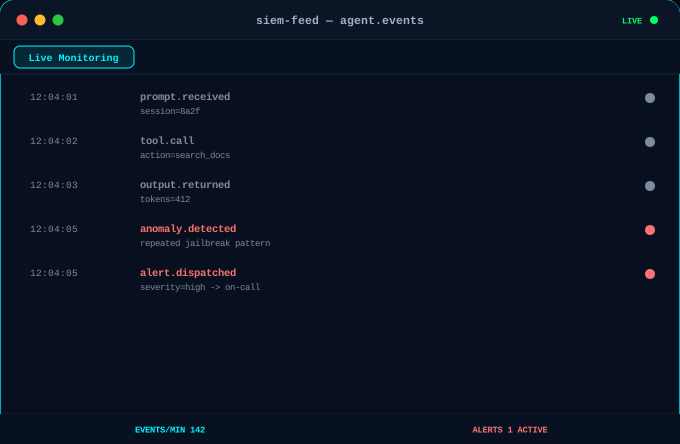
A minimal viable trail: every prompt received, every tool call made, every output returned, tied to a session ID. Without this, an anomaly detector has nothing to compare against, and an incident review has no record to reconstruct from.
Monitoring Principle
If it isn't logged, it didn't happen — from an incident-response standpoint.
2. Patterns Worth Alerting On
- Repeated jailbreak/injection attempts: the same session probing multiple prompt-injection patterns in a short window.
- Abnormal tool-call sequences: a session calling tools outside its typical/expected pattern for that workflow.
- Output anomalies: unexpected system-prompt fragments, credential-shaped strings, or other-tenant data appearing in output.
3. Log vs Alert: A Practical Split
| Event | Log only, or real-time alert? |
|---|---|
| Normal prompt/response cycle | Log for audit trail; no alert |
| Single failed injection attempt | Log; alert only if it repeats within a short window |
| Tool call outside expected scope | Real-time alert — likely elevation-of-privilege attempt |
| Output containing secret-shaped strings | Real-time alert and automatic output block |
| Cost/rate spike with no traffic increase | Real-time alert — possible abuse or runaway loop |
4. What This Is Not
This is not a request to log everything at maximum verbosity forever — that creates its own data-protection exposure and alert fatigue. The goal is a deliberately scoped trail, not a firehose nobody reviews.
Skills Demonstrated: Security Monitoring · SIEM Design · Incident Response Readiness · AI Operations
Related service: Security Audits · Related work: HarLyn Sentinel